
Wallet MCP by BudgetBakers
Connect your personal finance data — from the Wallet mobile/web app or REST API — to any MCP-compatible AI agent. Track spending, record transactions, manage budgets, and organize your finances through conversation.
MCP Server URL: https://mcp.wallet.budgetbakers.comCopied!
Setup guide: How to connect Wallet MCP to your AI agent
Permissions: Manage MCP permissions in the web app
Privacy policy: budgetbakers.com/en/privacy
Example Prompts
Available Tools (20)
The AI agent calls these tools automatically based on your request. Write tools support batch operations with per-item error reporting. Responses may include agent hints for data quality issues and constraints.
Read 9 tools
| Tool | Description |
|---|---|
get_client_profile | Client profile: permissions, sync state, tool inventory, base currency, budget settings |
get_records | List and filter transactions with sorting, pagination, and on-demand currency conversion. Supports filters by date, category, account, amount, text, labels, record state, record type, source, and transfer status. |
get_accounts | List bank accounts and wallets with balances, record statistics, and bank-sync status |
get_categories | List all ~90 base categories plus user-created custom categories with group hierarchy |
get_budgets | List budgets with pre-computed spending data: current/past period spent, remaining, progress, and per-period limit overrides |
get_labels | List custom labels (hashtags) for tagging and filtering transactions |
get_records_aggregation | Aggregate transactions with flexible grouping (category, month, account, etc.), compute expressions (sum, avg, min, max, median, absSum), and base-currency conversion via historical forex rates |
get_entity | Unified read access to supplementary entity types: standing orders, standing order items, goals, and record rules |
get_references | Check which entities reference a given record, account, category, or label — use before deleting |
Create 5 tools
| Tool | Description |
|---|---|
create_records | Batch-create up to 50 transactions per request. Supports regular records, paired transfers (two linked records across accounts), unpaired transfers, cross-currency transfers with automatic forex conversion, and pairingMode "existing" to bind to an existing record. |
create_account | Create a single bank account or wallet with currency, initial balance, and color. Supported types: General, Cash, CurrentAccount, SavingAccount, Insurance. |
create_budget | Create a single budget with spending limits. Types: weekly, monthly, yearly, or custom date range. Optionally scoped to specific accounts, categories, or labels. |
create_category | Create a single custom category derived from an existing base category. Inherits the parent's group and optionally its color. |
create_label | Create a single custom label (hashtag) for tagging transactions. |
Update 5 tools
| Tool | Description |
|---|---|
patch_records | Batch-update up to 20 records: category, labels (full replace or incremental add/remove), note, counterParty, recordState, recordDate, amount, place, accountId (move between accounts). Supports $clear to reset fields including transfer state cancellation. |
patch_accounts | Batch-update up to 20 accounts: name, color, initial balance, archive status, bank account number. Currency is immutable. |
patch_budgets | Batch-update up to 20 budgets: limits (uniform or per-period overrides), name, account/category/label filters, close/reopen. |
patch_categories | Batch-update up to 20 categories: rename, recolor, or set cardinality. Supports resetting base category names to defaults. |
patch_labels | Batch-update up to 20 labels: name, color, or archive status. |
Delete 1 tool
| Tool | Description |
|---|---|
delete_documents | Permanently delete up to 20 records, accounts, budgets, categories, labels, standing orders, or record rules per request. Enforces referential integrity — accounts and labels with references are blocked until dependencies are removed. |
Permissions
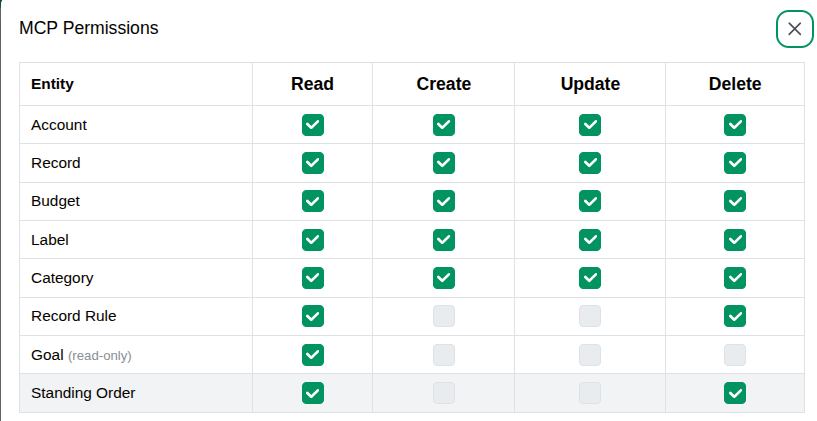
Layer 1: Wallet-level (MCP Permissions)
Set in the Wallet web app at web.budgetbakers.com/settings/mcp-server. Controls which operations the MCP server exposes at all. If you disable records.create here, no AI agent can create records, regardless of their own settings. This layer is always present.
By default, only read access is granted. Enable write permissions when you need them. Permissions are per entity type — you can allow creating records but not deleting accounts, for example.
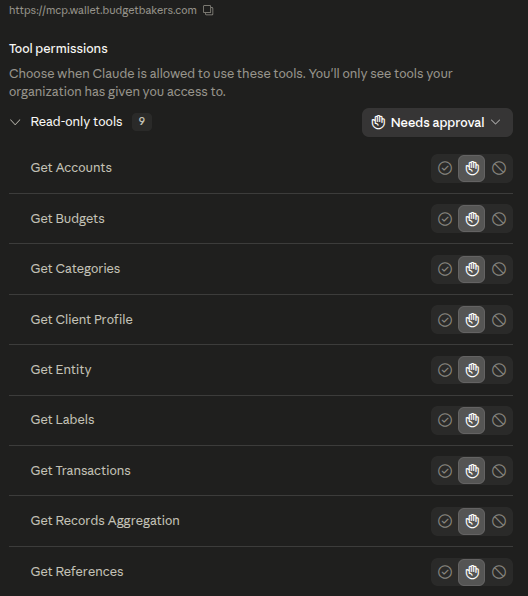
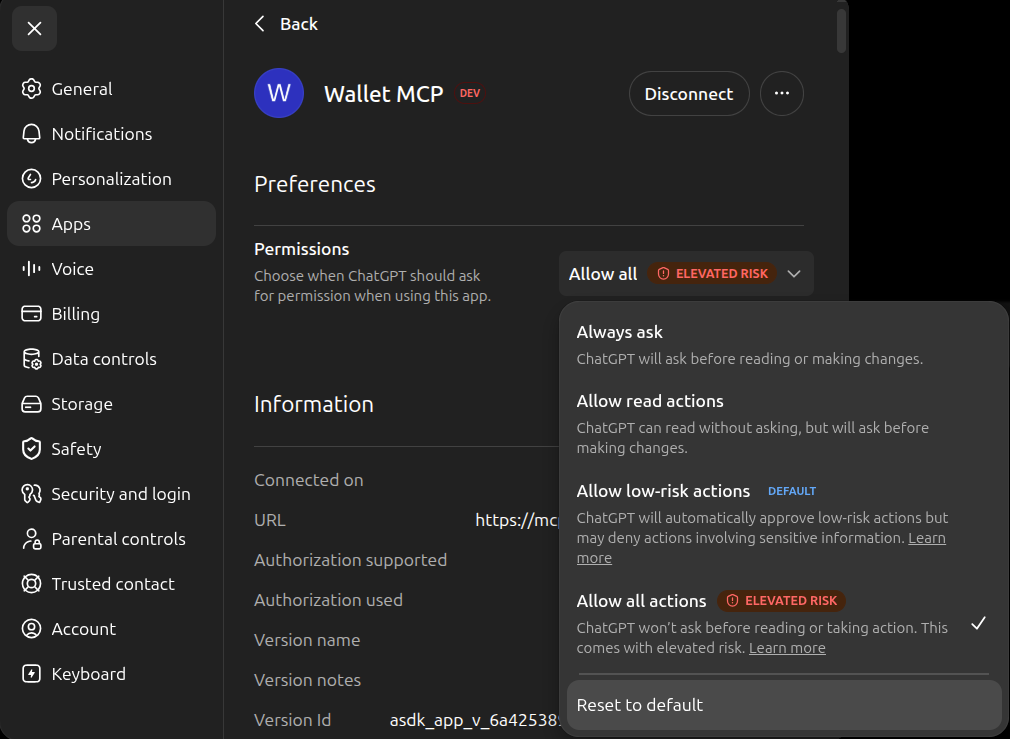
Layer 2: Agent-level (Tool Permissions)
AI clients may impose their own permission controls. For example, Claude offers tool-level permissions while ChatGPT has more broad options. These are Agent-specific safety layers that are independent of the Wallet layer (both have to be setup).
Technical Details
- Protocol: Model Context Protocol (MCP) over Streamable HTTP
- Authentication: OAuth 2.0 with PKCE for automated flows (e.g. Claude). Manual token generation is also available in Wallet settings for MCP clients that don't support OAuth.
- Rate limiting: Dual bucket (burst + sustained). Rate limit state is included in every response via
_meta.rateLimit. - Batch operations: Batch responses include per-item success/error reporting (partial success is possible). See tool descriptions for per-tool limits.
- Agent hints: Responses include contextual hints for data quality issues, transfer constraints, category conflicts, and sign-flip warnings
- Currency: Any ISO 4217 fiat currency code is supported. Historical forex rates are fetched automatically for cross-currency operations. Conversion follows a best-effort approach — rates are sourced from public market data and may differ slightly from bank or exchange rates.
- Sync: Data is synchronized from the Wallet mobile/web app and REST API. Change propagation to MCP may take up to 15 minutes.
- Session: Each request is authenticated with a personal Access token. Access can be revoked at any time from Wallet settings.
Fair Use Policy
The rate limits are a ceiling that keeps the server responsive for everyone, not a throughput
target to aim at. We ask every client to stay comfortably inside them and to treat a
429 Too Many Requests as an instruction to slow down rather than an obstacle to retry
through.
Sustained abuse of the limits may cost you access. Where a client keeps exceeding its budget over an extended period — in particular by continuing to send requests after being refused — we reserve the right to invalidate its access tokens and to temporarily suspend the account's access to the MCP and REST layers.
Troubleshooting
Data not showing up
| Symptom | Cause | Fix |
|---|---|---|
| All tools return errors or empty data | Initial sync hasn't completed yet. Happens on first connection. | Call get_client_profile and check syncState. If "syncing", wait 1–2 minutes and retry. If "error", check syncError.code. |
| Recent app changes not visible | Data syncs from the mobile/web app periodically, not instantly. | You might have to wait up to 15 minutes before the changes are visible in MCP. If the issue persists, report as bug. |
syncError.code: "missing_base_currency" |
User hasn't set a base currency in the app yet. | Open Wallet app → Settings → set a base currency, then retry. |
Permission errors
| Symptom | Cause | Fix |
|---|---|---|
| Write tool returns "<permission> permission not granted for <entity>" | The required permission scope (e.g. records.create) is not enabled. |
Go to web.budgetbakers.com/settings/mcp-server and enable the needed scope. Call get_client_profile to verify grantedScopes. |
| Tool call rejected with "invalid params" | Input doesn't match the tool's JSON schema (wrong type, missing required field, value out of range). | Check the error message for the specific field. Common: amount must be a number (not string), recordDate must be ISO 8601, accountId must be a valid UUID. |
Rate limiting
| Symptom | Cause | Fix |
|---|---|---|
Requests return 429 Too Many Requests |
Rate limit exceeded. The API uses a token-bucket algorithm with burst and sustained limits. | Back off and retry after a short delay. Capacity refills continuously. To monitor proactively, check _meta.rateLimit.remaining in any successful tool response. |
Common write errors
| Error | Cause | Fix |
|---|---|---|
| "category cannot be changed on transfer records" | Transfer records have their category locked to Transfer (system category). | Cancel transfer state first with $clear:["transfer"] in a patch_records call, then change the category. |
| "records on bank-synced accounts can only have category, labelIds, note, and counterParty patched" | Bank-synced records have amount, date, and state locked by the bank feed. | Only metadata fields can be patched on bank-synced records. Amount, recordDate, recordState, and accountId are immutable. |
| "cannot move record to account with different currency" | Patching accountId to move a record to an account with a different currency. |
Source and target accounts must have the same currency. Delete and recreate the record on the target account if currencies differ. |
| "<entity> has active references: N record(s), M budget(s)" | Trying to delete an account, category, or label that is still referenced by other entities. | Use get_references to check what references the entity, then remove or reassign those references first. |
Batch response with mixed success: true and success: false |
Batch operations are not atomic — each item is processed independently. | Check summary for counts and results[] for per-item errors. Fix the failed items and retry only those. |
Transfers
| Symptom | Cause | Fix |
|---|---|---|
| Paired transfer amount mismatch after patching one side | For same-currency pairs, amount is auto-propagated to the mirror. For cross-currency pairs, it is not. | Check the transfer_mirror_propagated agent hint. For cross-currency pairs, patch both sides separately. |
summary.total is larger than input array length |
Paired transfers add a mirror record to the results. summary.total counts output rows, not input items. |
Use isMirror: true on result items to identify mirror records. They share the same inputIndex as their root. |
Report Issue
- Open Settings → Help in the Wallet web app and click Go to Help Center.
- Click Support and Feedback.
- Select Report Issue.
- Click Submit a request.
-
Complete the report form:
- Issue type: Bug
- Subject: prefix with
MCP:for faster routing to the correct team - Description: include the prompt, response, and tool name.
Tip: ask the AI agent to write it for you:
"Summarize what just went wrong as a bug report. Include: what I asked, which Wallet MCP tool was called, the input you sent, and the error you received. Format it so I can paste it into a support form."Copied!